
Mobile Device Management (MDM)
Unified mobile endpoint governance, zero-touch Apple and Android device enrollment, air-gapped BYOD application protection, and rapid cryptographic remote wiping.
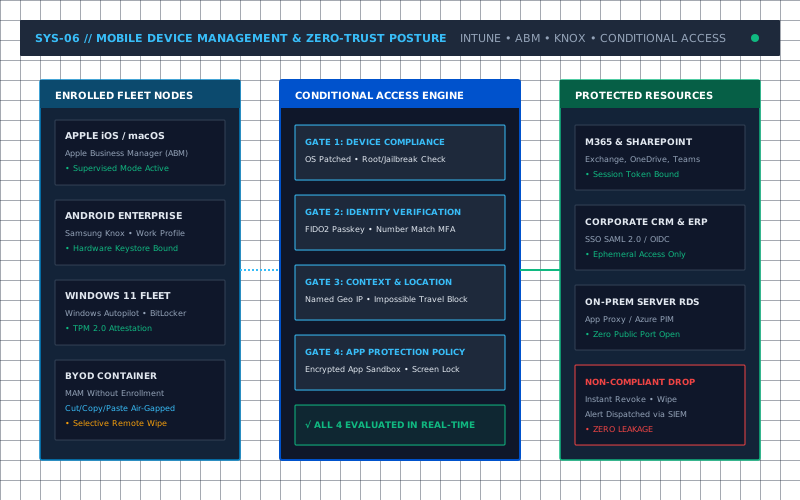
Apple ABM & Windows Autopilot
Cut/copy/paste strictly blocked
Automated jailbreak/root lock
Instant cryptographic purging
Architectural Capabilities & Deliverables
Specific technical interventions, deployment baselines, and governance deliverables included in this practice.
Integration with Apple Business Manager (ABM), Android Enterprise Zero-Touch, and Windows Autopilot to deliver corporate-ready hardware directly to users without IT unboxing.
Mobile Application Management without enrollment, isolating corporate Outlook, Teams, and OneDrive files inside an encrypted sandbox while preserving personal privacy on employee-owned phones.
Blocking authentication requests from devices that fail compliance benchmarks (outdated OS versions, disabled screen lock passcodes, detected root/jailbreak, or missing disk encryption).
Instant cryptographic erasure of corporate credentials and cached files upon employee termination or lost device report, without touching personal photos or apps.
Seamless distribution of enterprise 802.1X certificates, always-on VPN configuration profiles, and corporate Wi-Fi credentials without exposing passwords to end users.
Locking warehouse handhelds, retail POS tablets, and healthcare check-in terminals into single-app kiosk modes preventing user tampering and unauthorized web browsing.
Supported Technology Stacks & Protocols
Vendor-neutral integration across enterprise hardware, hypervisors, and cloud environments.
- • Microsoft Intune Endpoint Manager
- • Apple Business Manager (ABM)
- • Android Enterprise / Samsung Knox
- • Windows Autopilot Deployment
- • Apple iOS 16/17/18
- • Apple iPadOS & macOS Sonoma/Sequoia
- • Android 12 through 15
- • Windows 10 / 11 Enterprise & Pro
- • SCEP / NDES Certificate Delivery
- • FIDO2 WebAuthn Passkeys
- • Microsoft Authenticator Push
- • Intune Company Portal
- • App Protection Policies (MAM)
- • Device Compliance Baselines
- • BitLocker Hardware Encryption
- • FileVault 2 Encryption Key Escrow
Legal Practice: Air-Gapping Client Records on Mobile Devices
A Central Florida legal firm had 45 attorneys accessing confidential litigation documents on personal iPhones and iPads without corporate encryption, risking severe client privilege breaches.
Steve Cormier deployed Microsoft Intune Mobile Application Management (MAM) with Conditional Access, enforced biometric FaceID unlock on corporate apps, disabled cut/copy/paste into personal apps, and enabled one-click corporate wipe.
100% of confidential client documents air-gapped from personal apps, complete compliance with Florida Bar digital privacy guidelines, and zero loss of personal employee data.
Ready to Architect Your Mobile Device Management?
Direct consultation with a 36-year Principal Systems Architect. Zero sales reps, zero vendor markups, and zero guesswork.